[EC-CUBE 2.11.2] 商品一覧ページに商品サブ画像を表示したい
ビジュアルが大事な商品なら、商品一覧ページにも商品サブ画像が並んでいると良いかもしれませんね。
以下のような感じで、商品一覧ページにも表示させてみました。
追記:2.11.3~2.11.4をお使いの方はこちらをご参照ください。
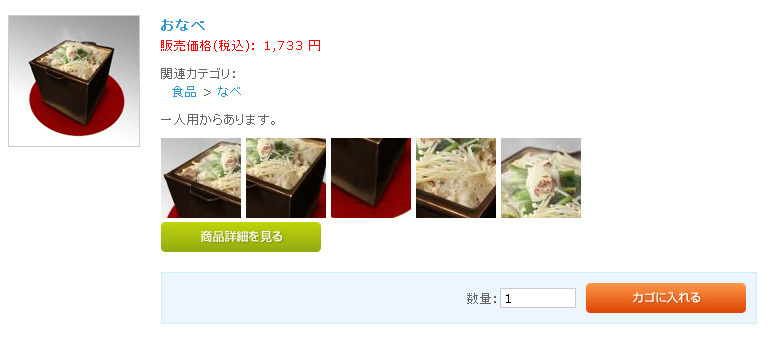
1.data/class_extends/SC_Product_Ex.php に以下の関数を追加
    function lists(&$objQuery, $arrVal = array()) {
        $col = <<< __EOS__
             product_id
            ,product_code_min
            ,product_code_max
            ,name
            ,comment1
            ,comment2
            ,comment3
            ,main_list_comment
            ,main_image
            ,main_list_image
            ,price01_min
            ,price01_max
            ,price02_min
            ,price02_max
            ,stock_min
            ,stock_max
            ,stock_unlimited_min
            ,stock_unlimited_max
            ,deliv_date_id
            ,status
            ,del_flg
            ,update_date
            ,sub_title1
            ,sub_image1
            ,sub_title2
            ,sub_image2
            ,sub_title3
            ,sub_image3
            ,sub_title4
            ,sub_image4
            ,sub_title5
            ,sub_image5
__EOS__;
        $res = $objQuery->select($col, $this->alldtlSQL($objQuery->where),
                                 "", $arrVal);
        return $res;
    }
拡張クラスファイルでlists()を再定義して、サブ画像関係の情報を取得するようにします。
拡張クラスファイルは使い慣れていない人も多いと思いますが、
継承元のクラス定義ファイル(この場合、data/class/SC_Product.php)の内容を上書きしたい時に使います。
コードは、class SC_Product_Ex extends SC_Product の { から } までの間に記述してください。
2.data/Smarty/templates/default/products/list.tpl に以下のコードを追加
サンプルでは、205行目付近(コメントの下)に配置してみました。
<!--{* サブ画像 *}-->
<!--{section name=cnt loop=$smarty.const.PRODUCTSUB_MAX}-->
<!--{assign var=key1 value="sub_title`$smarty.section.cnt.iteration`"}-->
<!--{assign var=key2 value="sub_image`$smarty.section.cnt.iteration`"}-->
<!--{if $arrProduct.$key2 != ''}-->
<img src="<!--{$smarty.const.ROOT_URLPATH}-->resize_image.php?image=<!--{$arrProduct.$key2|h|nl2br}-->&width=80&height=80" alt="<!--{$arrProduct.$key1|h}-->" />
<!--{/if}-->
<!--{/section}-->サイズが調節しやすいように、resize_image.php で画像を呼び出しています。
width や height を変えてみてください。
テンプレートの構造は最低限しか書いていないので、いろいろアレンジしてみてくださいね。